Reply @Wyper_check under any post and a sourced verdict lands in the same thread in about 20 seconds. What it checks, what it refuses, and the costs.
This article was researched and drafted with AI, then checked and released by a person before it went live. The illustration is not AI-generated: it is rendered from HTML. Every factual claim links to its source, so you can verify it yourself.
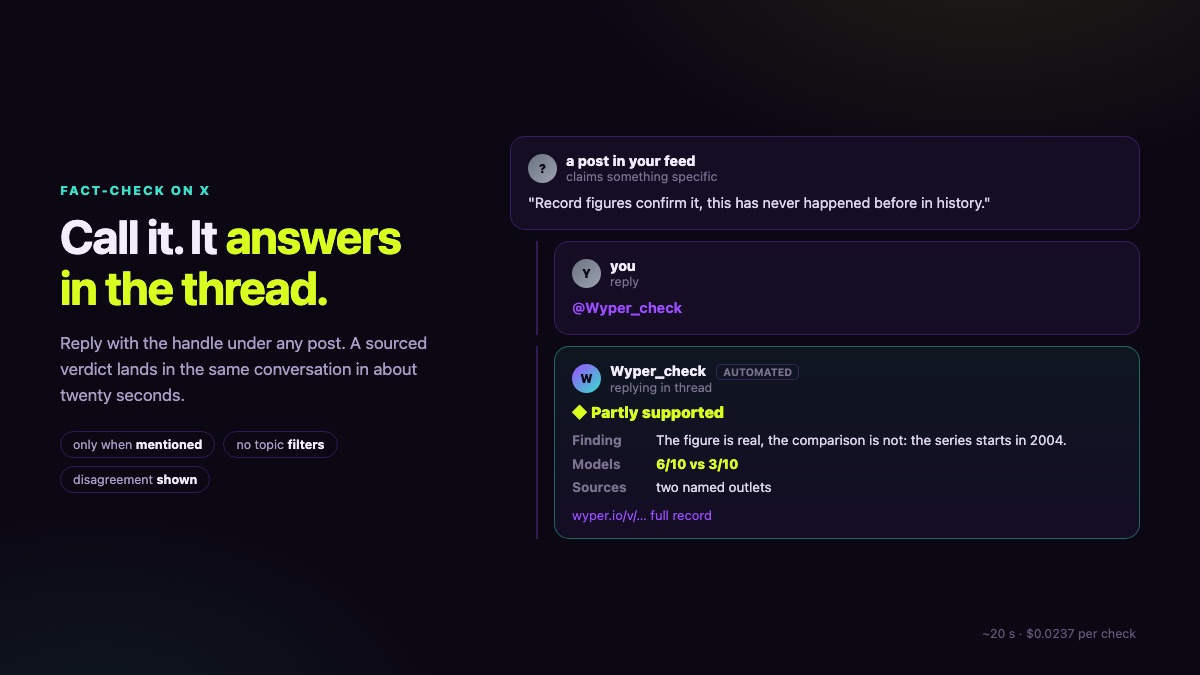
Illustration, rendered from HTML. A phone screen showing a reply thread where a verdict card with sources appears beneath a post
Mention @Wyper_check in a reply to any post on X and the bot checks the claim in the post above it, then answers in the same thread with a verdict, the disagreement between two models, two named sources and a link to the full record. It answers only where it is called, and it refuses opinions and predictions rather than guessing.
Most fact-checking happens somewhere else. You see a claim, you open a new tab, you search, you read, and by the time you know anything the post has travelled another few thousand shares. The gap between seeing a claim and knowing something about it is where misinformation lives, and every extra step widens it.
So we put the check inside the thread. Reply to any post on X with @Wyper_check and the bot verifies the claim in the post above your reply, then answers in the same conversation. Measured end to end: about 20 seconds, or roughly one second when the same claim has been checked before.
The bot answers only where it was explicitly mentioned. Never on its own, never by scanning timelines for things it might have an opinion about.
That is not politeness. It is the line between permitted automation and spam under the platform's rules, and therefore the survival condition of the account. So it is enforced structurally rather than by instruction: without a mention in the text and a parent post to check, the guard returns nothing, and there is no code path around it. Three cases in the regression suite exist purely to keep it that way.
Two more hard limits sit next to it. The bot never replies to itself or to its own posts, which would be both an endless loop and a budget leak. And for public checks it always uses the same depth, never the expensive deep-dive modes, so a stranger cannot run up our bill by calling it repeatedly.
A fact-checking bot that produces an answer for everything is the single largest reputation risk you can build. Ours declines three kinds of input outright:
The important detail is what the refusal says. It never answers "not this topic". It says there is nothing here to support or refute. That distinction matters because it keeps the boundary at checkability rather than at subject matter.
The bot does not filter by topic, by political leaning, by outlet or by origin. No bonus for legacy media, no preferred newsrooms, no excluded subjects, no political pre-selection. What gets called gets checked, and what the search finds is what backs the answer.
That claim was checked against the code on 28 August 2026. The only lists in there are a name mapping for display, turning a domain into a readable outlet name, and a marker noting when an image copy sits on a fact-checking site. Both label, neither excludes.
There is a small history behind this. A proposal to exempt politically charged claims from checking was raised internally and struck out. It contradicts the core of the product: whoever decides what may be checked has already taken a side, and a fact-checker you can assign to a camp is worthless. The user decides what gets checked.
The same doctrine runs through the rest of our work, and it is measured rather than promised: across 24 claims with the deciding document named in advance, 63 percent of everything our retrieval returned was a primary document, 14 percent legacy media, and other fact-checkers 1 percent, a single hit in the whole run.
Every reply has the same shape, so that after reading two you know where to look in the third.
<icon> <verdict>
Finding: what the evidence says, plainly
Image:   whether the picture is authentic     only when an image was checked
Models:  5/10 vs 2/10                         only when the two models disagree
Sources: the outlets                          only when sources were retrieved
<link to the full record>
Two rules govern that layout, and both came out of real mistakes.
A line disappears only when the information does not exist, never because space ran out. On 28 August the finding text took the 280 characters first, the image line needed 50 and received 33: the check had run, the reader never saw it. Space is now reserved in advance rather than handed out in order of appearance.
The link is the evidence. Whatever does not fit in a reply sits complete on the record page: the full finding, every source, and the scores from both models. The reply is the summary, not the report.
When the two models reach different scores, the reply says so with both numbers. That is deliberate, and our own measurement is the reason.
We tested 30 claims against a frozen set of sources. Two models agreed in 29 of 29 cases, including deliberately contested ones. Two systems trained on overlapping text are correlated, not independent, so "confirmed by two AIs" carries far less information than it sounds like. A third model of different origin, reading exactly the same sources, disagreed in 3 of 26 cases, every time with a machine-verified quote.
So when you see two numbers that differ, that gap is the most useful thing on the card. It tells you the evidence is genuinely contested, which is a finding in itself.
| Item | Measured value | How it was measured |
|---|---|---|
| Reading mentions | $0.00 | 104 calls, balance unchanged |
| Posting a reply | $0.01 per post | 6 posts in one run, balance before and after |
| The check itself | $0.0137 | ledger over 63 runs |
| Per @Wyper_check summon, total | $0.0237 | check plus post |
| With a cached claim | $0.0100 | only the post is new |
| Answer time | about 20 seconds | measured end to end |
We publish this for the same reason we publish our error rates: a service that hides its unit economics is a service whose limits you discover at the worst moment. The daily ceiling is five dollars, which carries roughly 210 complete answers.
One measurement lesson is worth passing on, because it nearly cost us a factor of five. A single reading after mixed activity suggested five cents per post. Separating the effects, first 50 pure read calls, then six posts in one run, showed the true figure was one cent. Platforms bill per returned object, not per call, so a call returning 1000 objects costs a thousand times one that returns one. If you build on a metered API, measure each effect on its own.
The bot works on X only. It reads the post above the mention, not an entire thread. It never rules on intent, because a newsroom quoting archive material and an account manufacturing outrage are indistinguishable to any model. A verdict is a statement about evidence, not a certificate of trustworthiness, and framing, timing and omission all survive a high score untouched.
The account carries the platform's automated-account label. You should always know when you are talking to software.
If you would rather check something without posting publicly, the free wyper web app does the same verification privately, five checks a day without an account.
Reply with @Wyper_check under any post on X and a sourced verdict arrives in the same thread in about twenty seconds, with the disagreement between two models visible rather than smoothed over. It answers only when called, refuses what cannot be checked instead of guessing, and filters nothing by topic or origin.
The wyper Fact-Check extension runs these checks on the post itself: truth score, evidence chain, and the date gap that catches recycled footage.
The web app installs to your home screen in one tap. No store, no account.
Already using it? ★★★★★ Rate it on the Chrome Web Store. Reviews decide what others get shown first.
 wyper
wyper